Creating videos used to take hours—sometimes days. Script writing, filming, editing… it’s exhausting. What if you could skip all that and turn a simple document into a video in minutes?
That’s exactly what tools like Colossyan AI promise. But here’s the real question—does it actually deliver, or is it just another overhyped AI tool?
In this review, I tested everything—from avatar quality to pricing—to see where it works and where it completely falls apart. If you’re thinking of using AI avatars for content, this breakdown will save you time, money, and frustration.
Colossyan
Turn your documents or scripts into professional avatar videos in minutes—saving time, cutting costs, and removing the need for filming or editing.
Pros:
Cons:
What is Colossyan ?
Colossyan AI turns plain text into professional, human-like video content with AI avatars—eliminating the need for cameras, actors, or editing skills.
Create scalable training, marketing, and explainer videos in minutes, cutting production costs and time while delivering consistent, studio-quality output across languages and teams.
Most people already have content—slides, notes, training docs. Colossyan helps you turn that into video without starting from zero. And that’s where it fits best. Not as a full video suite—but as a fast content-to-video tool.
Who is Colossyan For? (Ideal Use Cases)
Why I Love Colossyan?
Company Background
Colossyan AI is a fast-growing AI video platform based in London, England.
Founded in 2020, it’s still relatively new—but clearly focused on one thing: making video creation simple for anyone.
With around 80 people behind it, Colossyan isn’t a massive company. But that shows in a good way. The product feels focused, not overloaded with random features.
At its core, Colossyan is built for one purpose:
Turn your text, documents, or presentations into avatar-led videos—without needing any editing skills.
No cameras.
No complicated software.
No learning curve.
Just input your content, and the AI handles the rest.
My First Impressions (Unboxing Colossyan AI)
Colossyan AI has made one thing very clear: they’re all-in on AI avatar video generation. No distractions, no feature overload — just talking-head style videos powered by AI avatars.
And honestly, that level of focus can be a strength.
But here’s the catch — it also feels a bit too narrow.
While most competitors are building full ecosystems around video (think video translation, editing tools, podcast workflows, repurposing features), Colossyan seems intentionally… static. They haven’t expanded much beyond their core offering.
So the question naturally comes up:
Are they staying focused — or falling behind?
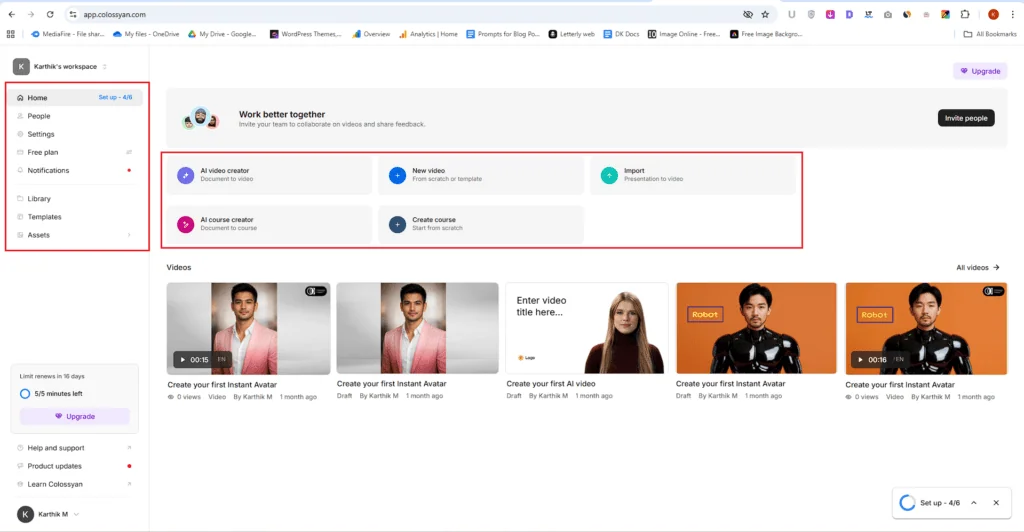
The Unexpected Pivot: AI Course Creation
Now this is where things get interesting — and a little confusing.
Colossyan recently introduced:
- AI Course Creator
- Course Creation Features
At first glance, it sounds useful. Even promising.
But when you think about it, it feels slightly out of place.
These features don’t directly enhance AI avatar video creation. They don’t improve the core product. Instead, they branch into a different use case entirely — course building.
Which makes me wonder:
Why go sideways instead of doubling down on video?
Unique… But Does It Make Sense?
To be fair, this move does make Colossyan stand out.
Most AI video tools are racing to add adjacent features — things that support video workflows:
- Script generation
- Voice cloning
- Editing tools
- Multiplatform publishing
Colossyan? They went in a different direction.
And depending on your workflow, that might actually be a win.
If you’re someone who:
- Creates training content
- Builds online courses
- Needs structured learning material
Then having AI avatars plus course creation in one place could save time and simplify your stack.
The Real Take: Niche Power or Missed Opportunity?
Here’s my honest take:
Colossyan feels like a tool that could be more — but chooses not to be.
Their focus on AI avatar videos is sharp, but maybe too rigid. And while the course creation features are unique, they also feel slightly disconnected from the core product.
That said…
If your workflow specifically needs:
- AI talking-head videos
- Built-in course creation
Then yes — Colossyan might actually be the only tool that checks both boxes right now.
Just don’t expect it to be a complete, all-in-one AI video platform. Not yet, at least.
Colossyan isn’t trying to be everything — and maybe that’s intentional.
But in a space where everyone else is evolving fast, staying this focused comes with a trade-off.
The real question is:
Is that focus helping them stand out… or quietly holding them back?
Try it and see how it fits
Colossyan Features (Deep Dive)
AI Video Creator
Colossyan AI doesn’t overwhelm you at the start.
Once you click AI Video Creator, you’re given two clear paths. No confusion. No clutter. Just pick how you want to begin.
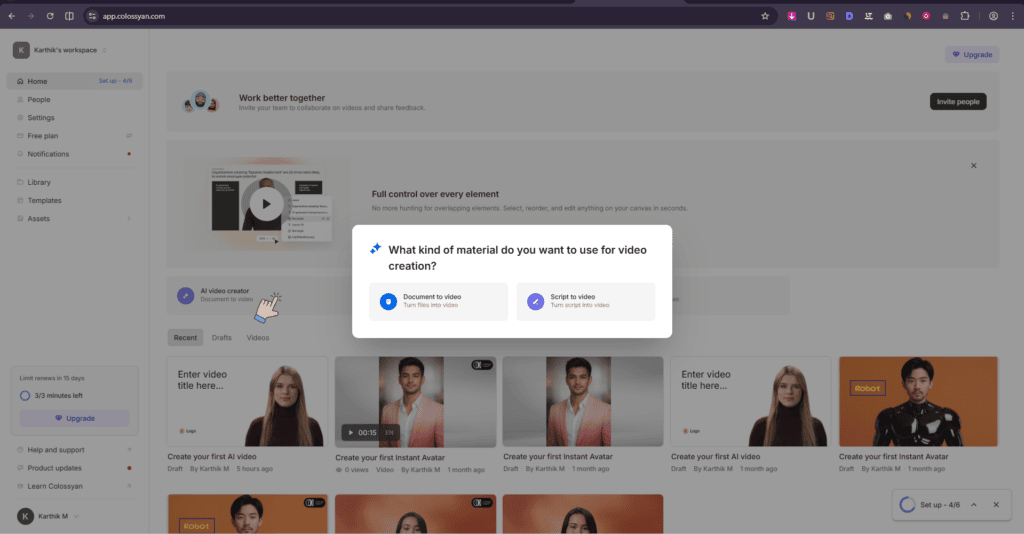
📄 Option 1: Document to Video (Zero Script Needed)
This is the easiest entry point.
Upload your document, and the AI takes over. It reads your content, understands it, and turns it into a full AI avatar video.
No script writing. No structuring.
If you already have PDFs, notes, or training material—this saves a ton of time.
✍️ Option 2: Script to Video (More Control)
If you like control, this is your route.
Upload your script, and Colossyan builds the video around it. Same idea—but now you guide the message.
In both cases, the workflow feels the same:
You give input → AI handles the heavy lifting.
It selects avatars, adds scenes, places text, and builds the structure on its own. That’s where the real time-saving kicks in.
New Video
There’s also a “New Video” option if you want to build everything yourself.
You can:
- Start from scratch
- Or pick a template and tweak it
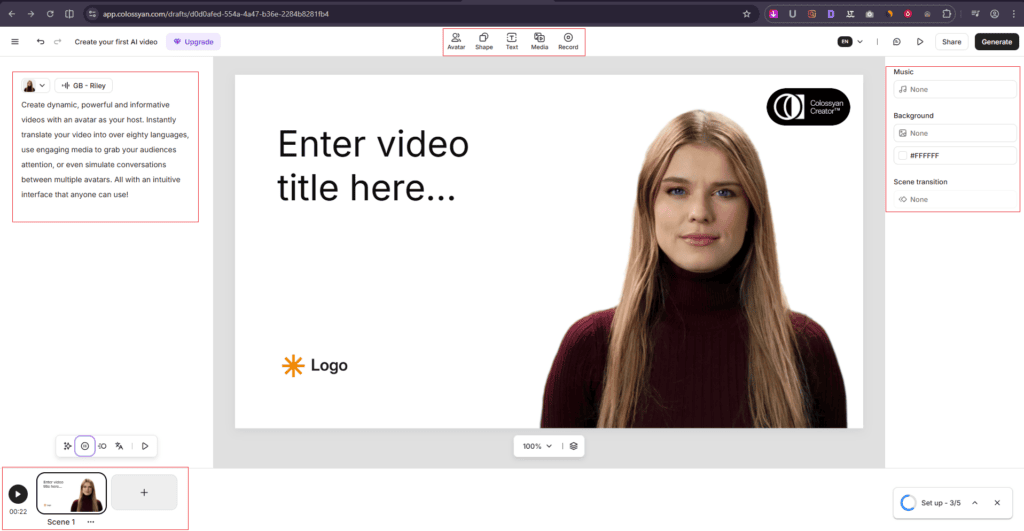
This is where you get hands-on. You can change almost everything—avatar, background, text, voice, shapes, even add media and music.
It doesn’t feel restrictive. You’re not locked into AI decisions.
🧩 Scene-by-Scene Editing (This Part Is Underrated)
One feature I really liked: scene-based editing.
You can add multiple scenes using the plus icon. Each scene acts like its own mini-frame.
Why this matters:
- You can change avatars between scenes
- Switch backgrounds anytime
- Adjust text or layout without affecting the whole video
It gives you flexibility without making things complicated.
🗣️ Script + Voice = Your Final Output
On the left side, you add the script your avatar will speak.
Pick a voice, adjust it if needed, and that’s pretty much it.
Once everything looks right, just hit Generate.
And your video is ready.
🎭 Public Avatars Feel Surprisingly Real
When I first tested Colossyan AI’s public avatars, I was honestly impressed.
The voices sound natural.
The lip-sync is tight.
Facial expressions actually feel human.
At a glance, it doesn’t scream “AI video.” That’s a big win—especially if you’re creating training or business content where credibility matters.
⚠️ Custom Avatars Tell a Different Story
Then I tried uploading my own avatar photo… and the experience dropped fast.
The output looked noticeably artificial.
- Head movement felt stiff
- Body language didn’t match the voice
- Overall presence felt off
It’s one of those moments where you instantly notice something isn’t right.
It’s clear Colossyan has trained their built-in avatars really well.
But custom avatars? They don’t hit the same level. Not even close.
That gap creates an awkward inconsistency—especially if you were expecting similar quality when using your own image.
🔊 Voices Are Still a Strong Point: One thing that does hold up: the voices.
There’s a wide library, and the quality is solid across the board. Natural tone, good clarity, and usable for most professional scenarios.
So while the visual side struggles with custom avatars, the audio side stays reliable.
💡 My Honest Take
If you stick with public avatars, you’ll likely be happy with the results.
But if your workflow depends on custom avatars, this is where you need to pause and test carefully.
I’ve shared my result below—watch it and decide for yourself. The difference is hard to ignore.
Import
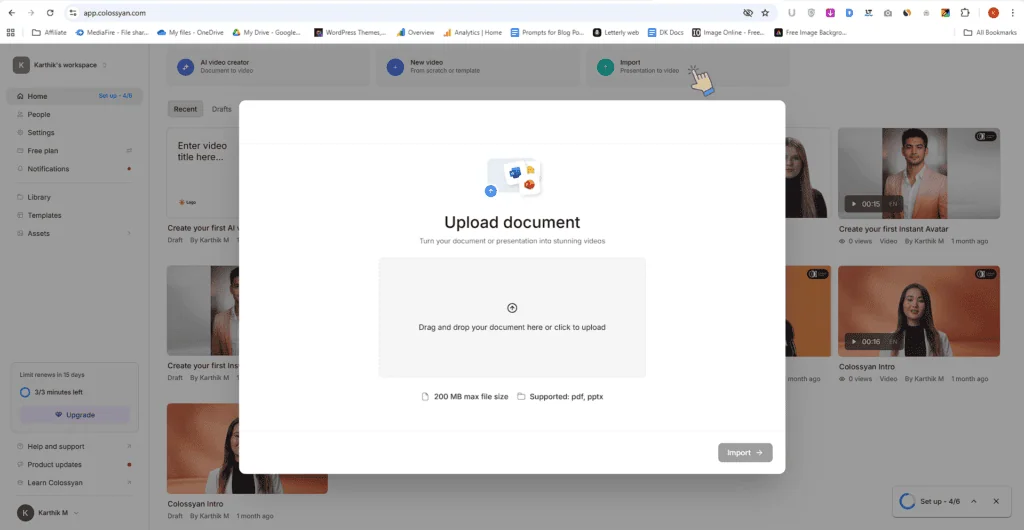
One feature I genuinely found useful in Colossyan AI is the Import option.
Instead of starting from scratch, you can upload your existing document or presentation—and turn it into a video.
No rewriting. No manual scene building.
If you already have content, this saves a lot of effort.
📄 What You Can Upload
It’s pretty straightforward:
- Upload a PDF or PPTX file
- Keep the file size under 200 MB
That’s it. Once uploaded, the AI analyzes your content and starts converting it into a structured video with an avatar.
⚡ Why This Actually Matters:
Most people already have content sitting around—slides, notes, training docs.
This feature helps you reuse what you’ve already created instead of building everything again from zero.
It’s not just about saving time. It’s about turning static content into something more engaging, without extra work.
Colossyan AI Pros and Cons
What I Liked (Pros)
What Could be improved (Cons)
Colossyan AI Pricing & Plans (2025)
Before we talk numbers, here’s where I stand.
Because of the custom avatar quality issues, I personally wouldn’t recommend Colossyan AI right now.
That said, tools improve. If you’re curious, you can still test it yourself. Just don’t commit long-term upfront.
💡 Start Monthly, Not Yearly
Colossyan offers a discount on annual billing (around 30% off).
But here’s my suggestion:
Start with one month.
Test it properly.
See if it fits your workflow.
Check if it actually saves you time or money.
If it proves useful, then switch to annual.
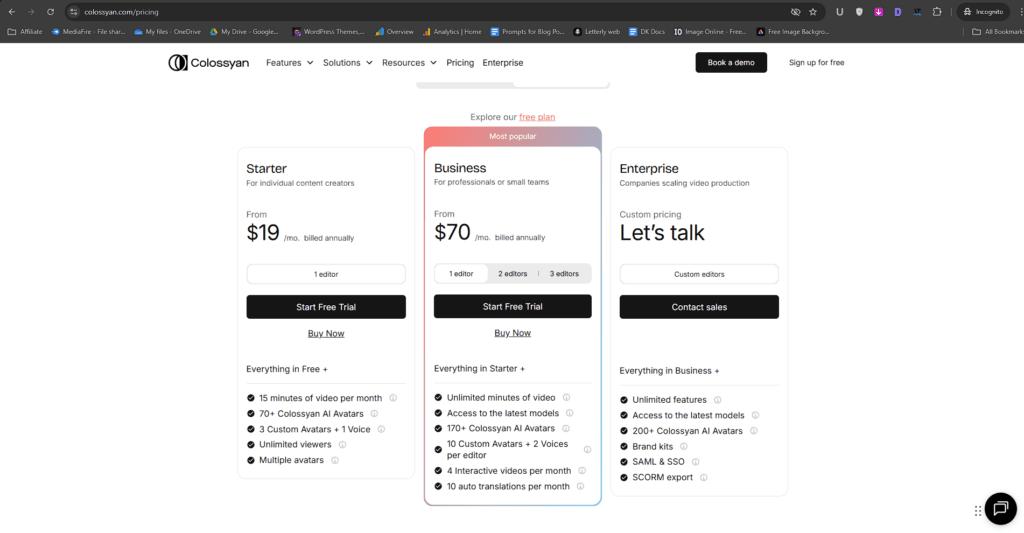
1️⃣ Starter Plan — $19/month
- 15 minutes of video per month
- 3 custom avatars
- 1 voice
I’ll be direct—this feels too limited.
15 minutes for an entire month runs out fast. For most people, it’s not practical.
2️⃣ Business Plan — $70/month
- Unlimited video minutes
- 10 custom avatars
- 2 voices
This is the only plan that makes sense if you’re serious.
Unlimited video generation gives you freedom to experiment, scale, and actually use the tool daily. It’s suitable for:
- YouTubers
- Marketers
- Solo creators
- Faceless channel builders
But here’s where things get tricky…
⚖️ Comparing It With HeyGen
When you compare Colossyan with HeyGen, the difference becomes obvious.
HeyGen’s Creator plan costs around $24/month (annual billing).
And it offers more than just avatar videos:
- Video translation with accurate lip-sync
- Multiple avatar styles
- B-roll generation
- Text-to-image
- Video podcast creation from links
In short, it supports your entire video workflow, not just one part of it.
🧠 My Recommendation: If you’re choosing purely based on value, flexibility, and features – I would go with HeyGen. It simply gives you more for less.
3️⃣ Enterprise Plan — Custom Pricing
This is for companies and larger teams.
You’ll need to contact Colossyan’s sales team for pricing. It includes:
- Team collaboration
- Branding options
- Scalable usage
If you’re running a business or managing a team, this is the plan to look at.
🧾 Final Verdict on Pricing
Colossyan keeps things simple—but maybe too simple.
You’re mostly paying for one core feature: AI avatar videos.
If that’s exactly what you need, the Business plan could work.
But if you’re looking for a more complete, flexible video creation ecosystem, there are better-value options out there right now. Myself recommend HeyGen AI.
Final Thoughts: Is Colossyan AI Worth It?
No, I will not recommend this for most people right now.
If your use case is simple—like creating internal training videos using built-in avatars—Colossyan AI can work. It’s fast, easy to use, and removes the need for filming or editing. That’s where it does its job well.
But if you care about realism, especially with custom avatars, this is where it breaks. The output looks artificial, movements feel off, and it doesn’t match the quality of their public avatars. Also, you’re paying a relatively high price for a tool that only focuses on avatar videos. Tools like HeyGen simply offer more value and flexibility.
Biggest strengths: simplicity and speed.
Deal-breakers: poor custom avatars and limited ecosystem.
My recommendation: skip it unless your needs are very basic.
Real User Reviews & Feedback
Trustpilot
Capterra
G2
Positive Stories
negative Stories
FAQs – Discover Answers Readers usually Search
Colossyan AI is a mixed experience. It’s fast, simple, and great for basic avatar videos—but it clearly has gaps, especially with custom avatars and overall feature depth. For some users, that won’t matter. For others, it’s a deal-breaker.
That’s why this tool isn’t a “yes for everyone”—it really depends on how you plan to use it.
I’ve shared my honest experience, but your use case might be different.
👇 Have you tried Colossyan AI or any similar tools? What worked for you—and what didn’t?
3.2/5⭐
🔹Convert text into avatar videos
🔹Create videos without filming
🔹Turn documents into video content
🔑Feature:
⚒️Ease of Use:
💰Pricing:
🤝Support: