Most AI avatar tools look impressive… until you actually use them.
You upload a photo, paste a script, and expect a realistic talking video. But then something feels off. The face looks stiff. The movement feels robotic. And suddenly, you’re questioning if it’s even usable.
That’s exactly what this review breaks down.
I tested D-ID step by step — from public avatars to custom photos, settings, and final output. No hype. Just real results.
By the end, you’ll know if D-ID is worth your time, money, or if you should skip it completely.
D-ID
Create AI avatar videos from simple scripts, translate content into multiple languages, and scale video production without filming or editing.
Pros:
Cons:
What is D-ID?
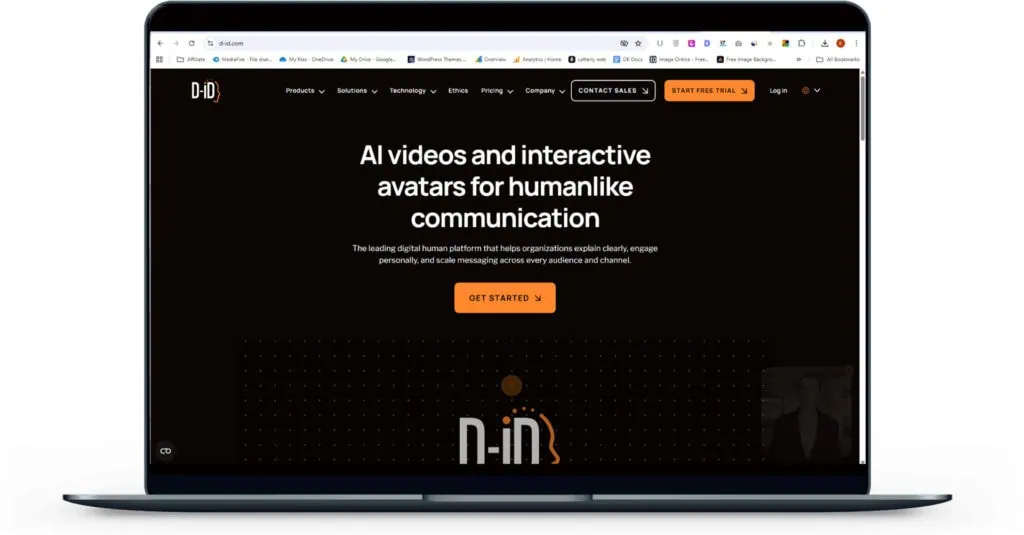
D-ID turns static images into lifelike talking videos, letting you create professional content without cameras, actors, or complex production setups.
Save hours of filming and editing while scaling personalized videos effortlessly for marketing, training, and communication at a fraction of traditional costs.
Who is D-ID For? (Ideal Use Cases)
Why I Love D-ID?
My First Impressions (Unboxing D-ID)
The moment I opened D-ID, one thing was clear — this tool is built for speed and simplicity.
There’s no complicated setup. No steep learning curve.
Right from the dashboard, everything feels straightforward. The UI is minimal, and you’re not overwhelmed with too many options.
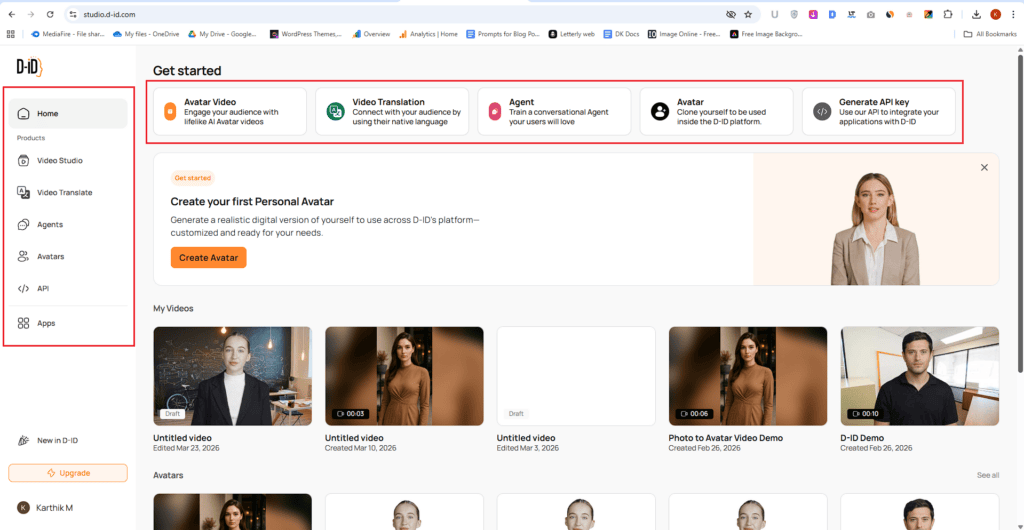
No confusion. No overload. Just a simple layout that makes sense.
You can spot the navigation menu in two places:
- At the top of the dashboard
- On the left sidebar (below the Home button)
That alone makes moving around the platform feel effortless.
D-ID Features (Deep Dive)
D-ID doesn’t try to overwhelm you with too many features.
Instead, it keeps things focused. The main options you’ll see are:
- Avatar Video
- Video Translation
- Agent
- Avatars
- Generate API Key
That’s it. This is exactly what most users want — a tool that works without friction.
Avatar Video
Creating Your First Avatar Video (Templates vs Blank)
Once you click Avatar Videos, you’re taken straight to the Create Video tab — and this is where things get interesting.
Right away, you’ll see ready-made templates.
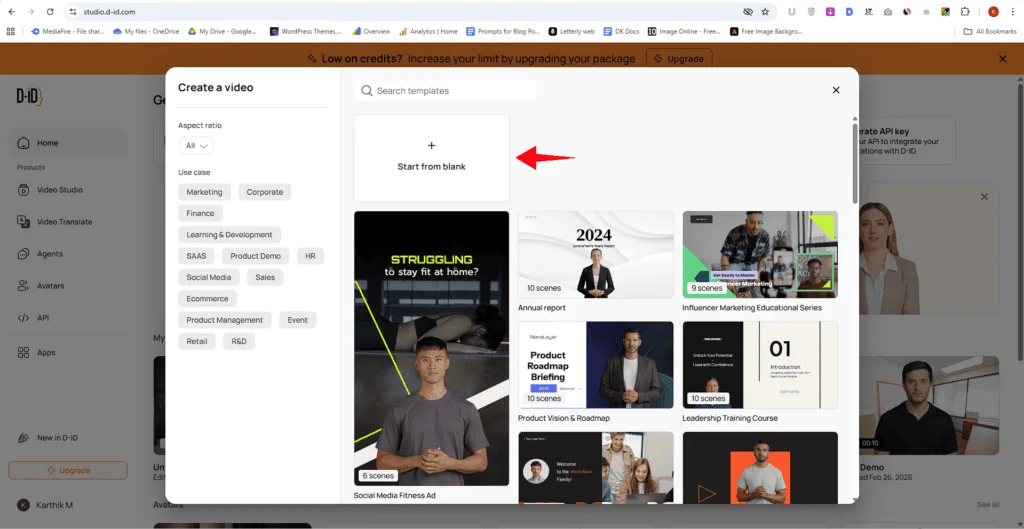
Quick Start with Templates (Big Time Saver)
These templates are built to save you effort.
Each one already includes:
- A public avatar
- Background
- Text layout
- Basic scene setup
All you have to do is add your script and generate.
👉 If you want speed and convenience, this is the easiest way to get started.
Start from Blank (Full Control Mode)
If you prefer building everything from scratch, there’s a “Start from Blank” option.
But here’s the thing — you’re in full control, which means you’ll set up everything manually:
- Avatar → Choose your character
- Script → Add what the avatar should say
- Background → Set your scene
- Text → Add captions or headings
- Shapes → Include visual elements
- Medias → Upload your own images or videos
It’s flexible, but definitely takes more time compared to templates.
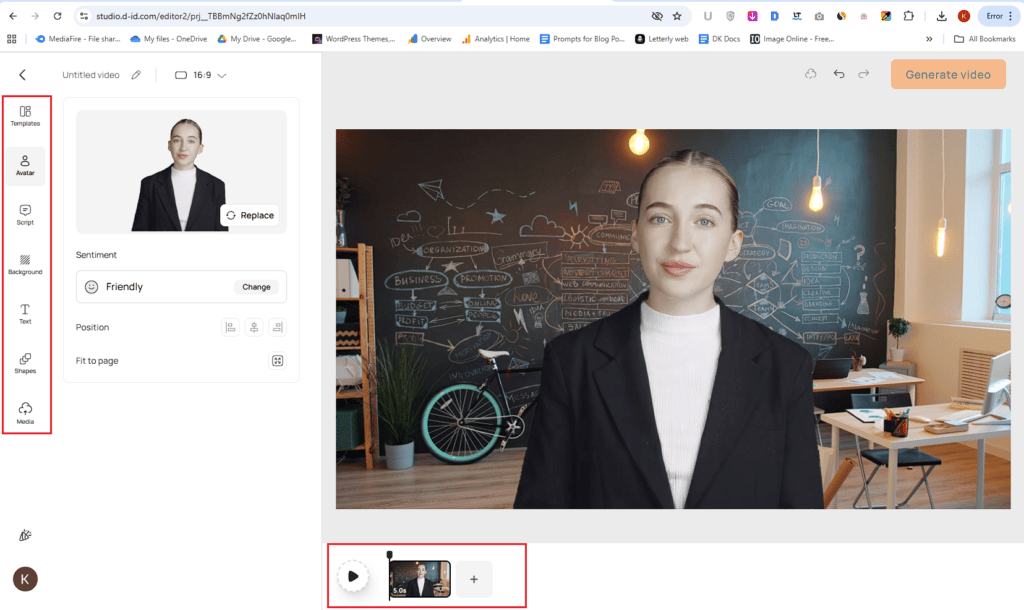
One thing I expected — but didn’t find — was built-in stock media integration.
Tools like Pixabay or Pexels aren’t connected here.
So if you want visuals, You’ll need to upload your own media manually.
Not a dealbreaker, but something to keep in mind.
Multi-Scene Videos Made Easy
You’re not limited to a single scene.
At the bottom, there’s an “Add Scene” option.
This lets you:
- Switch avatars
- Change backgrounds
- Add new text layouts
👉 Basically, you can create multi-scene videos in one go without jumping between tools.
My Honest Test Result: Not as Realistic as Expected
I wanted to give D-ID a fair shot.
So I tested the avatar using public avatar mode and uploaded my own photo to see how well it performs in a real scenario.
Below, you can check the actual output video and decide for yourself.
What Worked (The Good Part)
To be fair, not everything was bad.
- The lip sync was accurate
- The avatar followed the script correctly
- The video generated quickly
👉 On a basic level, it does what it promises.
Where It Falls Short
But once you look beyond the lip movement, the problems become obvious.
- The avatar looks flat and lifeless
- Facial expressions are very limited
- There is no natural body movement
- Overall feel is robotic, not human-like
👉 It doesn’t feel like a real person talking — it feels like an AI.
Why This Matters
If you’re creating content for:
- YouTube
- Marketing
- Personal branding
Presentation matters a lot.
And when the avatar looks unnatural, it can make your content feel Low quality, Less engaging, Less trustworthy.
That’s a big drawback.
My Final Verdict
I’ll be direct. Based on my test, I’m not satisfied with the output. Yes, the lip sync is good. But everything else — expressions, realism, presence — feels lacking.
👉 I wouldn’t recommend D-ID if your goal is to create high-quality, human-like videos.
It works on a basic level, but the end result still looks cheap and artificial — and that’s hard to ignore.
Create studio-quality videos with AI avatars instantly eliminating filming costs, saving time and scaling effortlessly
Video Translation
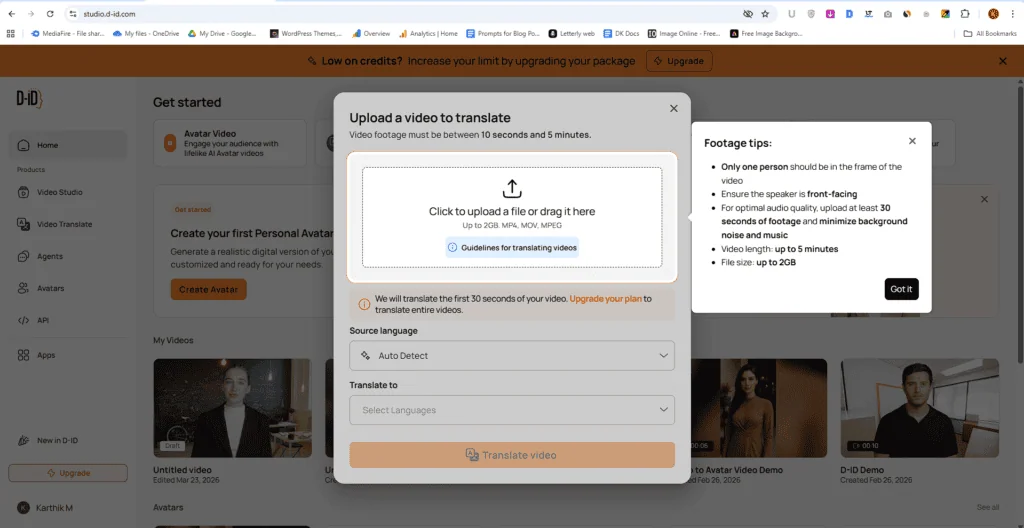
Instead of creating videos from scratch, you can take an existing video and translate it into multiple languages — with synced voice and lip movement.
That’s a big deal.
When I tested D-ID’s Video Translation, I realized something important — the output quality depends a lot on the input video.
D-ID actually gives clear guidelines. If you follow them, your results improve a lot. If you ignore them, you’ll likely see issues like bad lip sync or wrong translations.
Video Requirements (What You Need to Upload)
Before anything, here are the basic limits:
- Video length: 10 seconds to 5 minutes
- File size: Up to 2 GB
- Formats supported: MP4, MOV, MPEG
These are not optional. Think of them as must-follow rules if you want clean output:
- Only one person should be visible in the frame
- The speaker should be facing the camera directly
- Upload at least 30 seconds of footage for better audio quality
- Keep background noise and music minimal
These small things make a big difference in lip sync and voice accuracy.
Once you upload your video, D-ID will automatically detect the source language. Then you simply choose the language you want to translate into.
My Personal Test (Tamil Translation)
Out of curiosity, I wanted to test something specific.
Since I’m from Tamil Nadu, I checked if I could translate videos into Tamil — my mother tongue.
And honestly, I was impressed.
D-ID actually supports Tamil as a target language.
👉 That’s a big win, especially for regional content creators.
Also, fun fact — Tamil is one of the oldest living languages in the world, and as a Tamilan, that makes me genuinely proud.
Agent
This is where D-ID goes beyond just video creation.
The Agent feature lets you build a talking AI assistant that can interact with users in real time — not just play a script.
Think of it like this:
👉 Instead of a static chatbot, you get a face + voice + conversation.
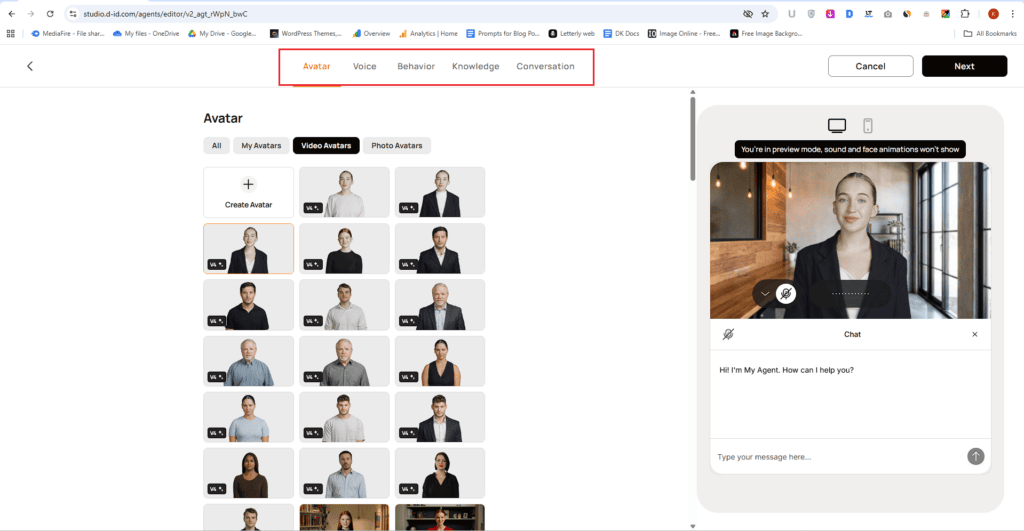
What the Agent Actually Does
D-ID Agent combines three things:
- A visual avatar
- A voice-based response system
- A trained knowledge base
So when someone interacts with it, the AI doesn’t just reply with text. It speaks back using an avatar, making the experience feel more human.
How You Train the Agent
The setup is simpler than you might expect.
You train the agent by giving it:
- Input Texts or Upload Files to provide broader knowledge base
- Images or Videos to show in conversation
The AI learns from this data and uses it to answer user questions.
👉 In simple terms: You’re feeding it your knowledge, so it talks like your brand.
Adjust Creativity Level (Control the Tone)
You can fine-tune how your AI responds using the creativity setting.
- Lower setting → More accurate, consistent, and fact-based
- Higher setting → More flexible, engaging, and conversational
👉 If you’re building a support assistant, keep it low.
👉 If it’s for engagement or storytelling, increase it.
Simple control, but very useful.
Customize the First Impression (Greeting Message)
First impressions matter — even for AI.
D-ID lets you set a custom greeting message that users see when they first interact with your avatar.
So instead of a generic “Hi,” you can:
- Introduce your brand
- Explain what the AI can help with
- Guide users on what to do next
👉 This makes the interaction feel intentional, not random.
Add Conversation Starters (Reduce User Friction)
Not everyone knows what to ask.
That’s why the conversation starters feature is smart.
You can predefine a few questions like:
- “What services do you offer?”
- “Can you help me choose a plan?”
These act as quick prompts, helping users start the conversation instantly.
👉 Less confusion = more engagement.
Set Topics to Avoid (Stay in Control)
This is an underrated but important feature.
You can define topics the AI should not respond to.
For example:
- Sensitive topics
- Off-brand questions
- Irrelevant queries
👉 This keeps your AI focused and prevents unwanted responses.
Limit Response Length (Keep It Concise)
You also get the option to control how long the responses should be.
By default, it’s turned off. But you can enable it and set a maximum word limit.
👉 Useful if you want:
- Short, direct answers (for support)
- Controlled outputs (for better user experience)
My Take:
This level of customization is what makes the Agent feature practical — not just interesting.
You’re not just creating an AI.
You’re shaping how it thinks, speaks, and behaves.
And that’s what turns it into something users will actually enjoy interacting with.
Avatar
If there’s one feature D-ID is known for, it’s this — AI avatars.
You’re not limited to pre-made avatars — you can create your own digital version and use it in your videos.
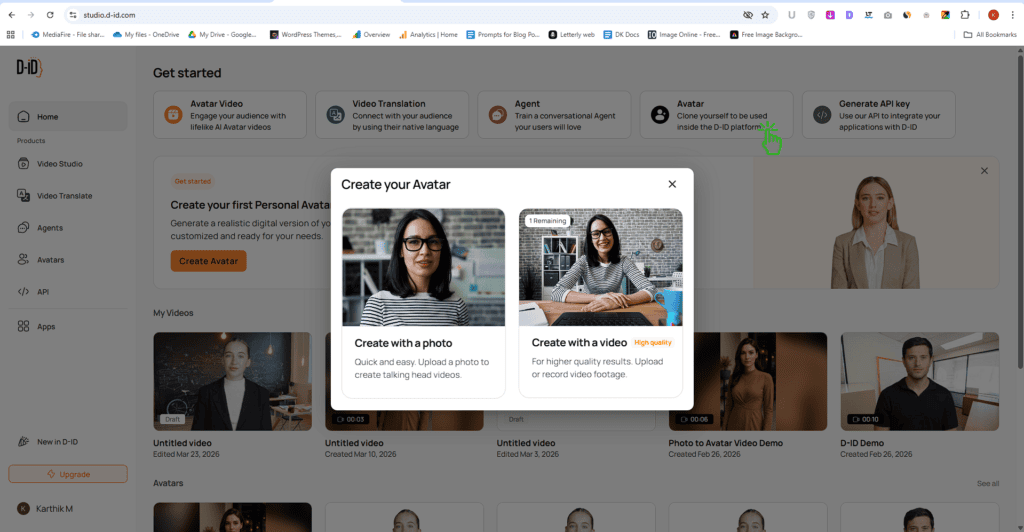
Option 1: Turn a Photo into a Talking Avatar
The simplest way is to upload a single photo.
D-ID takes that image and turns it into a talking head avatar that can read your script.
- Quick setup
- No recording needed
- Works well for basic videos
👉 Perfect if you want something fast without much effort.
Option 2: Clone Yourself Using Video
If you want something more realistic, you can go a step further.
Upload or record a video of yourself, and D-ID will create a more advanced avatar clone.
- Better facial movement
- More natural expressions
- Feels closer to a real human
👉 This is the better option if you care about quality and personal branding.
Once It’s Ready… It Works Non-Stop
Here’s the best part.
Once your avatar is created, it can:
- Speak any script you give
- Generate videos anytime
- Work 24/7 without you being present
👉 No camera. No retakes. No burnout.
Generate API Key
If you’re a developer, marketer, or running a product, the API feature lets you integrate D-ID directly into your own app or workflow.
What the API Actually Does
In simple terms, the API allows you to:
- Generate avatar videos programmatically
- Automate video creation at scale
- Connect D-ID with your website, app, or software
👉 Instead of manually creating videos, your system can do it automatically.
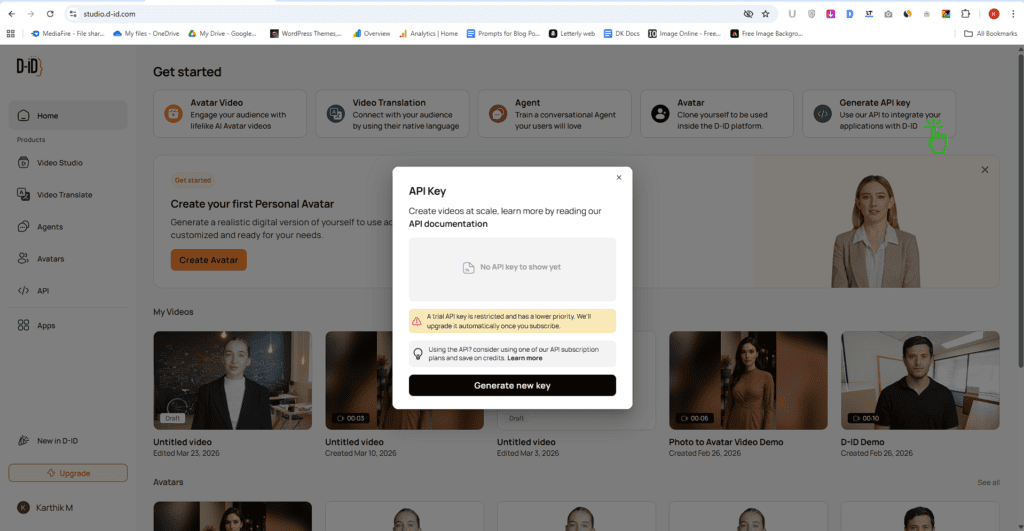
The API feature is not for everyone — and that’s okay.
But if you’re building something or want to automate video creation, this is where D-ID really shines.
It turns D-ID from a simple tool into a scalable video engine.
👉 For developers and businesses, this is a big advantage.
D-ID Pros and Cons
What I Liked (Pros)
What Could be improved (Cons)
D-ID Pricing & Plans (2025)
Now let’s talk about pricing — because this is where things get interesting.
At first glance, D-ID looks affordable. But once you look closer, the limitations become clear.
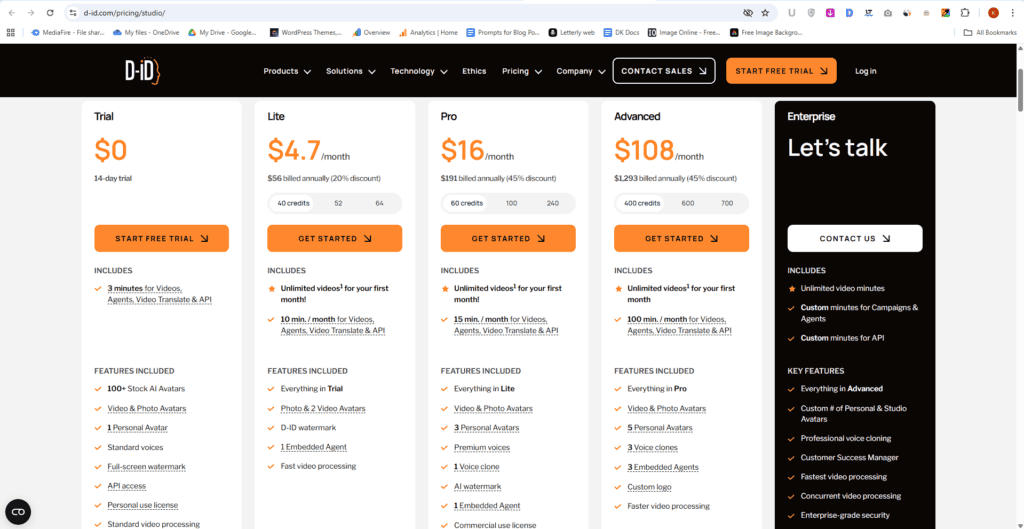
Here’s a quick breakdown:
- Lite Plan → 10 minutes/month
- Pro Plan ($16/month) → 15 minutes/month
- Advanced Plan ($108/month) → 100 minutes/month
Yes, the minutes increase as you upgrade.
But so does the price — quite sharply.
👉 You’re essentially paying based on how many minutes of video you create.
The Real Problem: Limited Usage
The biggest issue here is simple — video minutes run out fast.
If you’re:
- creating YouTube videos
- testing multiple scripts
- producing content regularly
10–15 minutes per month is very limiting.
👉 You’ll hit that cap quicker than you expect.
Comparing It With HeyGen
Now let’s put this into perspective.
HeyGen’s Creator plan costs around $24/month.
And what do you get?
This isn’t just about “minutes vs price.”
It’s about workflow.
With HeyGen:
- You get multiple tools in one platform
- No need for extra apps
- No patching things together later
Everything is built to help you create videos end-to-end.
My Take
D-ID’s pricing works if you create very limited content.
But if you’re serious about scaling video creation, the restrictions feel tight.
You’re not just paying for the tool — you’re paying for every minute you use.
And that’s where it starts to lose its edge.
Final Thoughts: Is D-ID Worth It?
No, most people should skip this.
D-ID only makes sense if you need quick, basic avatar videos for internal use, simple explainers, or low-stakes content where realism doesn’t matter much. Beginners experimenting with AI video tools might also find it useful for testing ideas.
But if you care about quality, brand perception, or creating professional-looking content, this is not the right tool. The avatars still look robotic, with weak expressions and limited movement. On top of that, the pricing feels restrictive for what you actually get.
The biggest strength is how easy it is to use. You can create a video in minutes. But the deal-breaker is the lack of realism and limited output quality.
If you’re serious about content or client work, skip it. Only consider it if speed matters more than quality.
Create studio-quality videos with AI avatars instantly eliminating filming costs, saving time and scaling effortlessly
Real User Reviews & Feedback
Trustpilot
Capterra
G2
Positive Stories
One thing that keeps coming up across user reviews is how easy D-ID is to use. People love that they can take a simple script, upload an image, and turn it into a talking video within minutes.
There’s no steep learning curve, no complex editing—just a fast, straightforward process. For many users, especially beginners and non-technical creators, this feels empowering.
It removes the stress of being on camera and makes video creation accessible. That speed and simplicity are what users genuinely appreciate the most—it just works without friction.
negative Stories
But there’s a clear frustration that shows up again and again. The final output often doesn’t feel realistic enough.
Users mention that while the lip-sync is decent, the facial expressions and movements still look stiff or unnatural. And this becomes a bigger issue when the video is meant for professional or brand use.
If the output looks slightly off, it can affect credibility. This isn’t a small flaw—it’s a core expectation. If D-ID wants to stay competitive, improving realism should be a top priority.
FAQs – Discover Answers Readers usually Search
After testing everything, one thing is clear—D-ID is not a one-size-fits-all tool. It works for quick, simple videos, but struggles when quality and realism matter. Some creators might find it useful, while others will outgrow it fast.
And that’s where your use case really matters. Everyone’s workflow is different, and what works for one creator might not work for another.
So now I’m curious—have you tried D-ID or any AI avatar tool before? What was your experience like?
You might Also Like this:
D-ID
3/5⭐
🔹Turns photos into talking avatars
🔹Generates AI videos from scripts
🔹Creates videos without filming
🔑Feature:
⚒️Ease of Use:
💰Pricing:
🤝Support: