What if you could cut your video hosting bill without sacrificing quality or control? That’s the question many creators are asking as Vimeo becomes more expensive and restrictive. Finding a platform that’s affordable, easy to use, and built for creators isn’t as simple as it sounds. That’s where Livid enters the conversation.
In this review, I’ll break down its features, pricing, real user feedback, pros, cons, and whether it’s actually worth switching from Vimeo. By the end, you’ll know exactly who Livid is best for—and whether it deserves a place in your workflow.

LIVID
Livid helps you host, migrate, and share ad-free videos with less effort, saving time while delivering a more professional viewing experience.
Pros:
Cons:
What is Livid?
Livid helps creators and small businesses escape expensive, cluttered video platforms by making it easy to host, manage, and share ad-free videos with a clean, professional viewing experience—without enterprise complexity.

Its biggest advantage is removing the friction of switching, automatically migrating videos, folders, and metadata from Vimeo so you can keep your library intact and stay focused on creating instead of rebuilding.
If you want reliable video hosting that saves time, lowers costs, and delivers a polished experience for clients and audiences, Livid offers a refreshingly simple alternative built for creators who value ease over unnecessary complexity.
Who This Is Perfect For
Not Ideal For
What problem does Livid solve?
Overall, Livid combines affordable pricing, effortless migration, strong customization, and creator-friendly support, making it a smarter alternative to traditional video hosting platforms like Vimeo.
Company Background
My First Impressions (Unboxing LIVID)
My first impression is that the dashboard feels clean and focused. There isn’t much on the screen, so it’s easy to understand where to start without feeling overwhelmed.
The large upload area immediately catches my attention, and the Browse files button stands out as the obvious first step. The Import from Vimeo option is also easy to spot, making it clear that switching platforms is a priority.
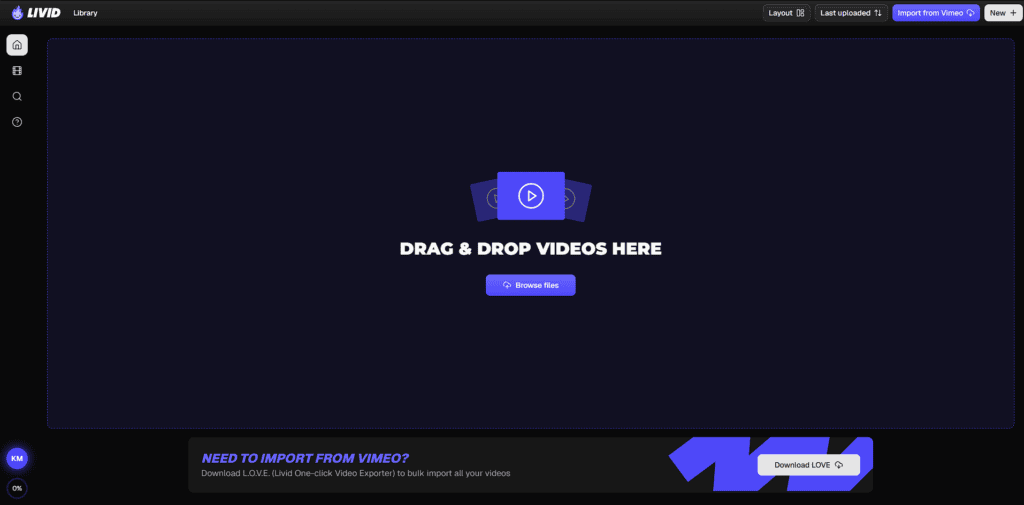
I did pause for a moment to figure out what the icons in the left sidebar do since they don’t have labels. I would probably hover over them before clicking.
Overall, I figured out the basic workflow within seconds. If the rest of the platform is this straightforward, Livid makes a strong first impression as a simple and beginner-friendly video hosting tool.
How Livid Works (Step-by-Step)
Getting started with Livid is simple. Whether you’re uploading new videos or moving your existing library from Vimeo, the process only takes a few steps. Here’s how it works.
1. Create Your Livid Account
Sign up for a free Livid account and access your video library. The dashboard is clean and easy to navigate, so you can start uploading right away.
2. Upload or Import Your Videos
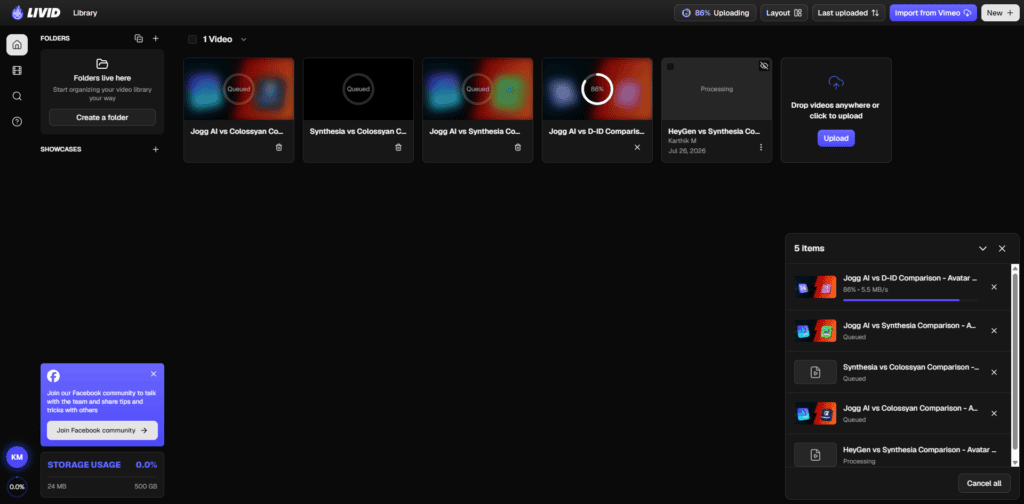
You have two ways to add videos:
- Drag and drop video files into your library.
- Click Browse Files or use the New menu to upload from your device. You can upload multiple videos, and Livid queues them automatically.
If you’re switching from Vimeo, use Livid’s free LOVE (Livid One-click Video Exporter). It can transfer your videos in bulk while keeping your folders, titles, descriptions, and privacy settings, making migration much easier.
Upload Experience: Uploading videos was much faster than I expected. I uploaded six videos (around 300 MB) in about a minute, even though my Wi-Fi speed is only 50 Mbps. Since Livid runs on Google Cloud, it delivers fast, reliable uploads that make getting your videos online quick and hassle-free.
3. Let Livid Process Your Videos
Once the upload finishes, Livid starts optimizing your video for different screen sizes and internet speeds. This helps your videos play smoothly across desktops, tablets, and phones. You can still access the video while processing continues.
4. Customize Your Video
After processing, you can improve your video’s presentation by:
- Editing the title and description
- Choosing or uploading a custom thumbnail
- Generating captions and transcripts
- Adjusting player settings (available on supported plans)
5. Share or Embed Anywhere
When everything looks good, copy the video link or embed it on your website. Livid supports ad-free playback, so viewers stay focused on your content instead of distractions. It also offers password-protected sharing and customizable player options on higher-tier plans.
So here’s my advice!
One thing I like is that Livid doesn’t try to reinvent video hosting. The workflow feels familiar: upload, organize, customize, and share. If you’re moving from Vimeo, the built-in migration tool removes one of the biggest headaches—transferring your entire library without starting from scratch. That makes getting started much faster, especially if you already have a large collection of videos.
LIVID Features (Deep Dive)
Ad-Free Video Hosting
Livid gives you ad-free video hosting, so your audience can watch without distractions. Your videos stay front and center, creating a cleaner and more professional viewing experience.
It also makes sharing easy with privacy controls, custom branding options, and a simple Vimeo migration tool. If you want full control over how your videos are presented, Livid is built for that.
Video Sharing & Embedding
👇 Before you scroll further…
Livid has just landed on AppSumo which means you can grab lifetime access with a one-time payment—before the deal disappears.
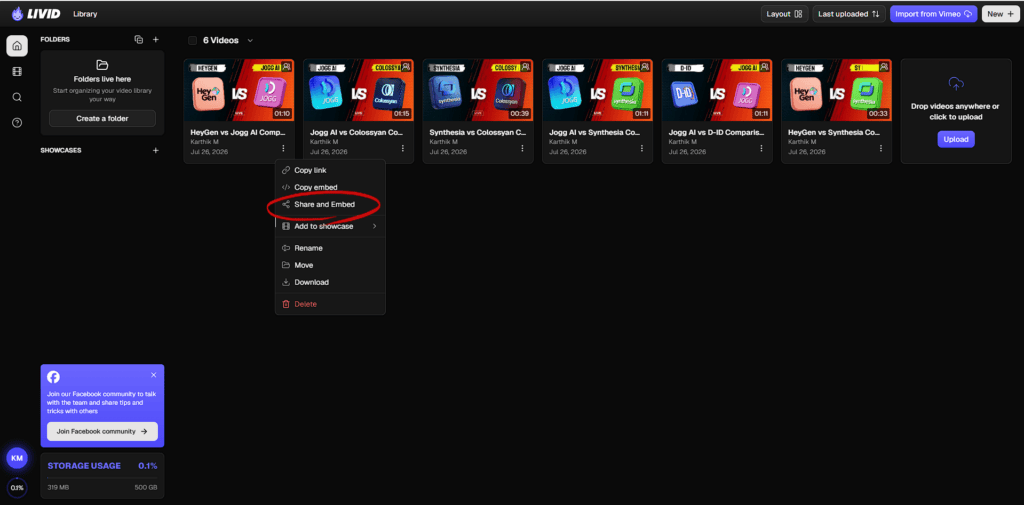
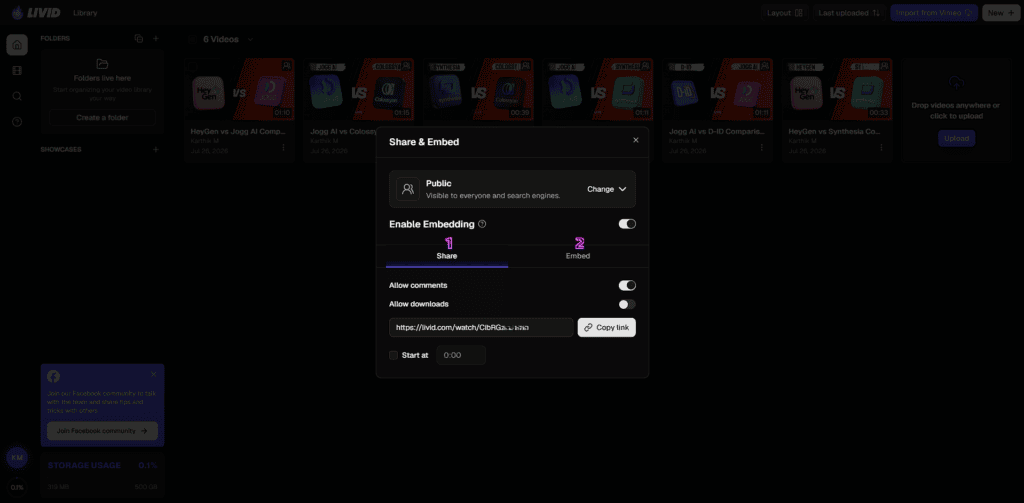
Sharing videos with Livid is simple. You can copy a direct link or embed your videos on your website in just a few clicks. It works with popular platforms like WordPress, Wix, and Squarespace, making it easy to publish videos wherever your audience is.
Livid also gives you more control over who can watch your videos. You can make them public, unlisted, password-protected, or private, and even restrict playback to specific domains. If you want a clean, branded video experience on your own website, these sharing and embedding options make Livid a practical choice.
Embedding Works, But It Could Be Better
Getting a video onto my website was straightforward, but it wasn’t as seamless as I expected. Simply pasting the Livid video link into a WordPress post didn’t automatically embed the video like platforms that support oEmbed.
Instead, I copied the HTML embed code from Livid and pasted it into a Custom HTML block. It worked perfectly, but I think Livid could improve the experience by adding support for oEmbed/Embedly and other major embedding standards. That would make publishing videos much faster for WordPress users and many other website builders.
It’s not a deal-breaker, but it’s one improvement I’d genuinely like to see. Now, let’s look at the other features that stood out during my testing.
Video Player Customisation
A good video player should do more than play videos—it should match your brand and give viewers a clean experience. After uploading my videos, I spent some time exploring Livid’s Appearance settings, and I was impressed by how much control it offers without making things complicated.
One of the first things I noticed was the branding panel. You can change the button color, accent color, icon color, text color, and background color to match your website or brand. If you have a logo, you can upload it and choose whether it appears before playback, during playback, or stays hidden. There’s even an option to make the logo clickable, which is useful if you want viewers to visit your website.
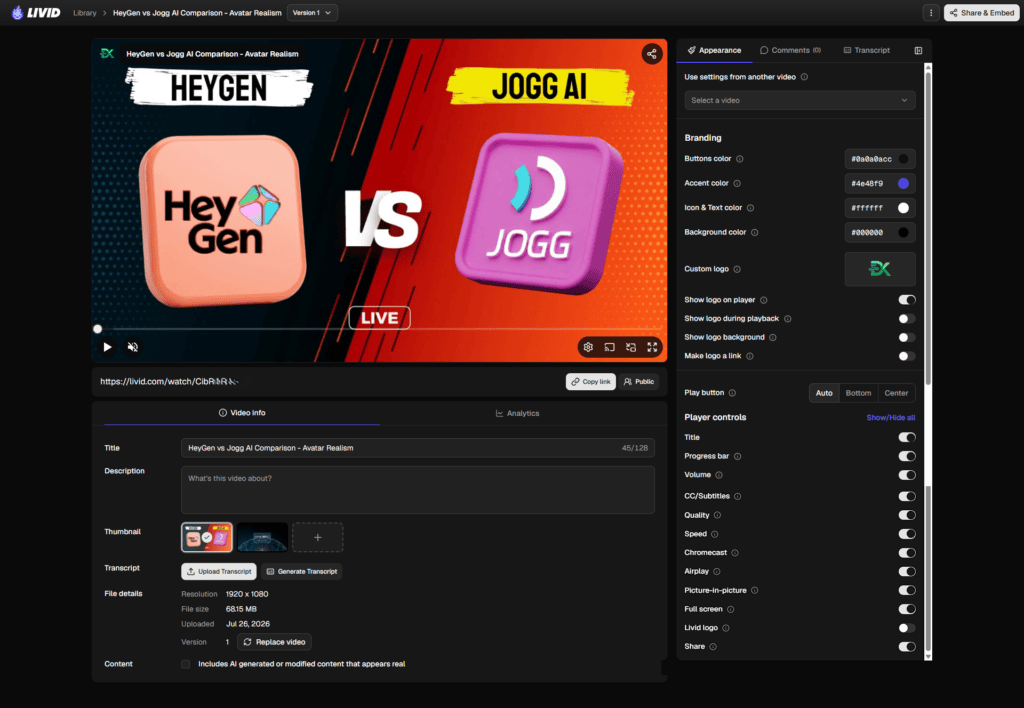
Livid also lets you decide how the play button appears. You can place it in the center or at the bottom of the video, depending on the look you’re going for. It’s a small detail, but it gives you more control over the viewer experience.
Another feature I liked is the ability to show or hide individual player controls. Instead of forcing every option on your audience, you can decide exactly what they see. You can enable or disable:
This level of customization is especially useful if you’re embedding videos on your own website. For example, you might hide the share button for private content or remove unnecessary controls to keep the player clean and distraction-free.
I also noticed an option to reuse appearance settings from another video. If you publish videos regularly, this can save time because you don’t have to customize every player from scratch.
Overall, I found the customization options easy to understand. Everything is grouped in one sidebar, and most changes only require flipping a switch. It strikes a nice balance between simplicity and flexibility, making it easy to create a video player that fits your brand without digging through complicated settings
Folder Organization
As your video library grows, staying organized becomes more important. Livid gives you two simple tools for this: Folders and Showcases. They may sound similar, but they serve completely different purposes.
Folders are for you. They help organize your videos behind the scenes, just like folders on your computer. You can group videos by client, project, campaign, or topic, making your library much easier to manage as it grows.
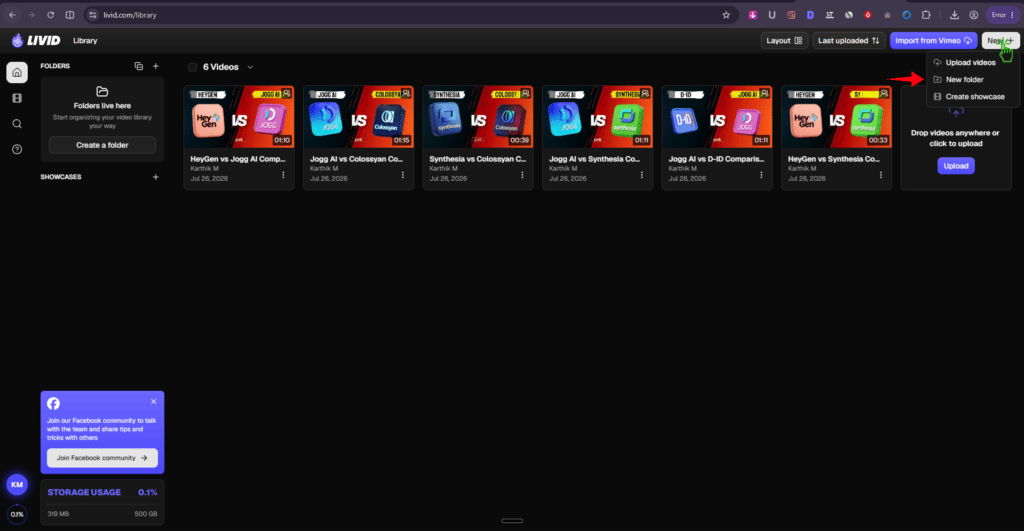
Showcases, on the other hand, are built for your audience. Think of a Showcase as a standalone video page where you can group related videos and share them with a single link. It’s perfect for creating a course module, product demo collection, client presentation, portfolio, or a category page that guides viewers through multiple videos in one place.
How to Create Showcase:
Creating a Showcase is straightforward. Select the videos you want, choose Create Showcase, then customize the page with a header image, description, layout, colors, and privacy settings. Once you’re done, Livid generates a shareable link that you can send to anyone.
🔔 Friendly reminder:
Claim the Livid Lifetime Deal now.
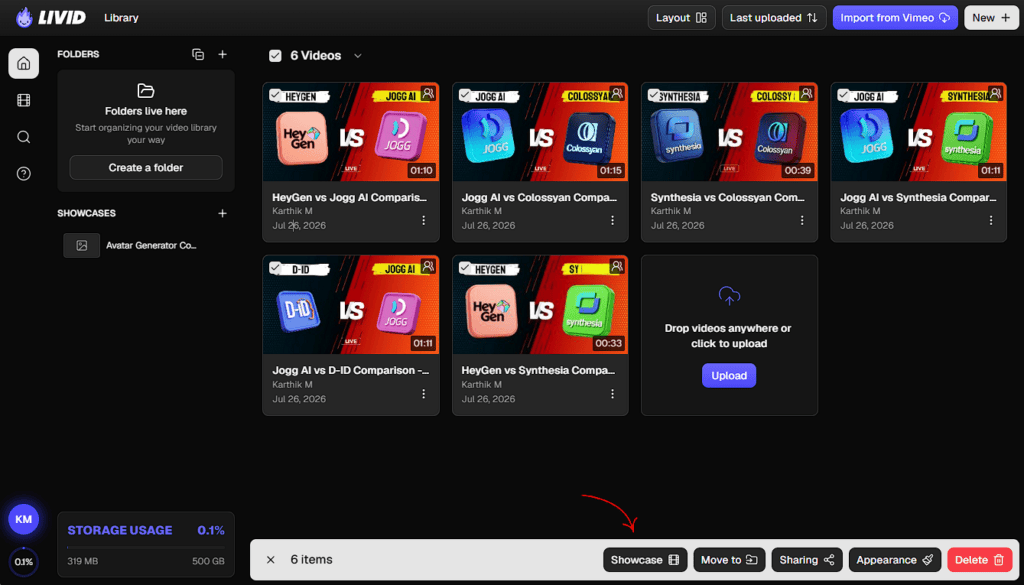
I like this separation between Folders and Showcases. One keeps your library organized, while the other helps you present videos in a way that’s easier for your audience to browse and understand. It’s a thoughtful feature that goes beyond simple video hosting.
To test this feature, I created a Showcase with all six of my AI avatar generator comparison videos. Instead of sharing six separate links, I now have a single page where anyone can watch the entire collection in one place.
I really like how simple the process was. Within a few clicks, Livid turned my selected videos into a clean, shareable page that I can send to my community. It’s a much better experience for viewers because everything they need is organized in one place instead of being scattered across multiple links.
Want to see how it looks? Check out my live Showcase page and see how smoothly Livid brings related videos together. Next, let’s explore another feature that stood out during my testing.
Vimeo Migration Tool – L.O.V.E
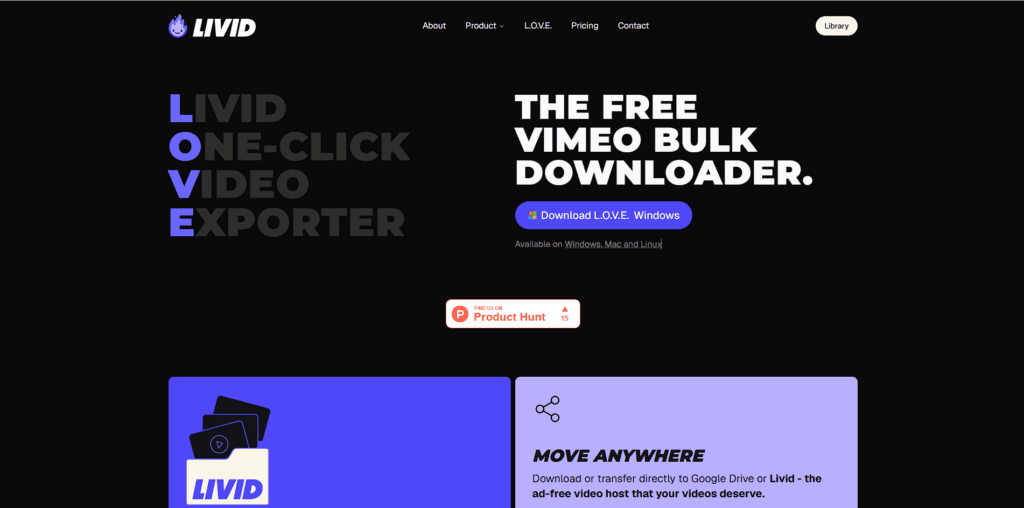
One of Livid’s biggest strengths isn’t just video hosting—it’s making it incredibly easy to leave Vimeo. If you’ve built a large video library over the years, migrating to a new platform can feel like a huge task. Livid removes that barrier with L.O.V.E. (Livid One-click Video Exporter).
L.O.V.E. automatically imports your videos, folders, titles, descriptions, thumbnails, and other metadata from Vimeo, so you don’t have to rebuild everything manually. Connect your Vimeo account, choose what you want to transfer, and let Livid do the heavy lifting.
I also think the timing of this feature is no coincidence. In 2025, Vimeo announced its acquisition by Bending Spoons, and many users began looking more closely at pricing and alternative platforms. Whether you’re affected by pricing changes or simply evaluating other options, Livid is clearly positioning itself as an easy migration path.
What makes this strategy even stronger is Livid’s pricing. Compared to many established video hosting platforms, the plans are simple, transparent, and generally more affordable. Pair that with a one-click migration tool, and the switch becomes much less intimidating. If you’re curious how the plans compare, check out the Pricing section below.
For anyone already considering a move away from Vimeo, I think L.O.V.E. is one of Livid’s most valuable features. It removes the biggest obstacle—moving your existing content—so you can focus on using the platform instead of rebuilding your entire video library.
Download L.O.V.E for Windows / Mac or Linux and migrate your Vimeo videos with just a few clicks.
Analytics
them, and Livid gives you a clean analytics dashboard for each individual video. I found it easy to understand without having to dig through complicated reports.
For every video, you can track views, unique views, impressions, view rate, average watch time, and total watch time. Livid also shows traffic sources, viewer devices, and top locations, helping you understand where your audience comes from and how they’re watching your content.
One feature that caught my attention is the Playback Heatmap, which is meant to highlight where viewers replay, skip, or drop off. During my testing, this section showed an error, so I couldn’t fully evaluate it. Once working, I think it could be a valuable tool for improving viewer retention.
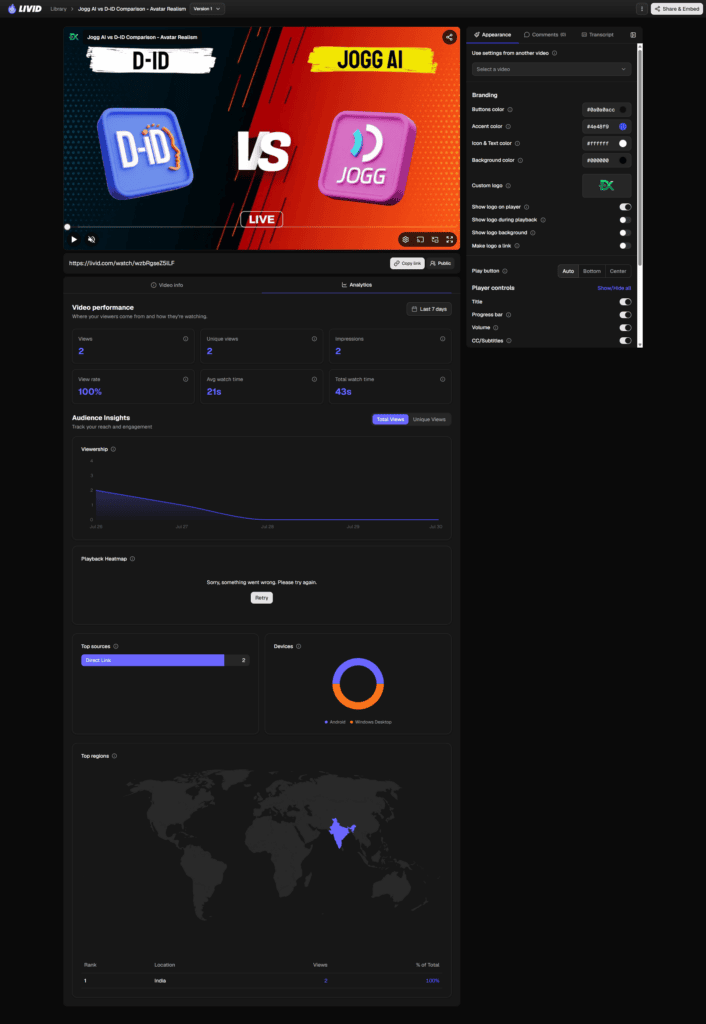
One thing I genuinely missed, though, was an overall analytics dashboard. Right now, analytics are available only for individual videos. If you publish content regularly, it would be much more helpful to have a single dashboard showing total views, watch time, top-performing videos, audience growth, and traffic sources across your entire library. I shared this feedback with the Livid team because I believe it would make the platform even stronger for creators and businesses managing larger video collections.
Overall, I like the simplicity of Livid’s analytics. It gives you the metrics you need without feeling overwhelming. With the addition of a comprehensive account-wide analytics dashboard, I think it would offer an even better experience for serious video creators.
Livid Pros and Cons
What I Liked (Pros)
What Could be improved (Cons)
Livid Pricing & Plans (2026)
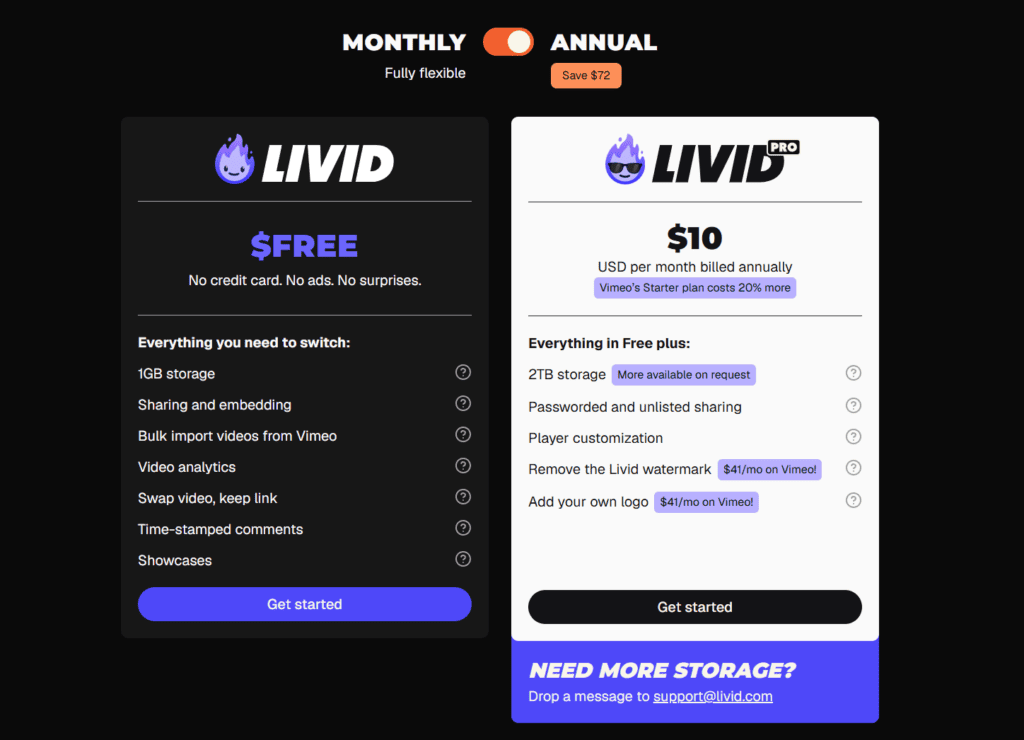
Livid Free
Price: Free
Best for:
Creators who want to try Livid, migrate from Vimeo, or host a small video library.
Includes:
- 1 GB of storage
- Video sharing and embedding
- Bulk Vimeo video import
- Video analytics
- Replace videos while keeping the same link
- Time-stamped comments
- Showcases
- No credit card required
- Ad-free experience
Limitations:
⚡ Before you continue…
🎯 Secure your Livid Lifetime Deal before it expires.
- Limited to 1 GB of storage
- Livid branding remains on the player
- No advanced player customization
- No password-protected or unlisted sharing
Livid Pro
Price: $10/month (billed annually)
Best for:
Businesses, creators, agencies, and anyone who needs more storage and full branding control.
Includes:
- Everything in the Free plan
- 2 TB of storage (more available on request)
- Password-protected and unlisted sharing
- Player customization
- Remove the Livid watermark
- Add your own logo
Limitations:
- Annual billing is required to get the advertised monthly price.
- No monthly price is shown in the screenshot.
Which Plan Should You Pick?
If you’re just testing Livid or planning to migrate from Vimeo, the Free plan gives you everything you need to get started without spending a penny. For anyone hosting videos professionally, the Pro plan is the clear value pick. At $10/month (annual billing), you get 2 TB of storage, custom branding, private sharing, and player customization at a price that’s noticeably lower than many competing platforms. Unless you only need a handful of videos, the Pro plan offers the best long-term value.
Final Thoughts: Is Livid Worth It?
Yes—if you want affordable, ad-free video hosting without Vimeo’s rising costs, Livid is absolutely worth considering. It offers one of the best value propositions for creators, course sellers, membership site owners, and small businesses that primarily need reliable video hosting, private sharing, and branded embeds rather than a huge ecosystem.
That said, it isn’t the perfect choice for everyone. If your workflow depends on advanced enterprise integrations, DRM protection, large team collaboration, or an extensive developer ecosystem, you’ll likely find platforms like Wistia, Bunny Stream, or other mature alternatives a better fit. Livid is still a relatively new platform, and some advanced capabilities are actively evolving.
Its biggest strengths are the affordable pricing, effortless Vimeo migration, and clean branded video experience. The biggest drawbacks are its younger ecosystem and fewer advanced enterprise features compared to long-established competitors.
So here’s my advice!
If you’re switching from Vimeo or starting fresh, Livid is an easy recommendation. If you require enterprise-grade security, deep integrations, or highly specialized workflows, compare a few alternatives before making the switch.
Tips to Get the Best Out of Livid
Best Alternatives to Livid
Livid is a strong choice for affordable, ad-free video hosting with an easy Vimeo migration path. If you want to compare a few more options before deciding, these alternatives are worth exploring.
- → Vimeo – Best for advanced collaboration and enterprise workflows
- → Wistia – Great for video marketing and lead generation
- → Vidyard – Ideal for sales teams and personalized video outreach
- → Bunny Stream – Affordable video hosting with global CDN delivery
- → Spotlightr – Built for course creators and video marketers
Most video hosting platforms offer a free plan, free trial, or money-back guarantee, so you can test them with minimal risk before committing.
Real User Reviews & Feedback
Appsumo
G2
Positive Stories
One thing users keep mentioning is how surprisingly easy the switch from Vimeo is. Many say they migrated entire video libraries in just a few hours, updated branding, and embedded everything without breaking their workflow, making Livid feel like a genuine time and money saver rather than just another hosting platform.
negative Stories
The biggest concern isn’t reliability—it’s that Livid is still a young platform. Several users mention small rough edges like missing default settings, storage limitations on lower plans, or features that are still evolving, suggesting the team should continue closing these gaps as the platform grows.
FAQs – Discover Answers Readers usually Search
Livid proves that you don’t have to spend a fortune to get reliable, professional video hosting. Throughout this review, we’ve looked at its pricing, features, migration tools, real user feedback, and limitations to help you decide if it’s the right fit.
While it may not replace enterprise-focused platforms for every business, it offers excellent value for creators, educators, and small businesses looking for a simpler Vimeo alternative. If affordability, branding, and private video hosting matter most to you, Livid deserves a closer look.
Have you tried Livid or are you considering switching from Vimeo? Share your experience or questions in the comments below!
Get the Deal Before It’s Gone
You might Also Like this:

Livid
4.6/5⭐
🔹Host videos confidently
🔹Reduce hosting costs
🔹Secure Private Sharing
🔹Affordable High Storage
🔑Feature:
⚒️Ease of Use:
💰Pricing:
🤝Support: